
Key Things to Know
- Biamp’s Kleeo Desk Manager is now Zoom Certified for Workspace Reservation.
- The integration lets employees reserve and manage desks directly through Zoom Workspace Reservation.
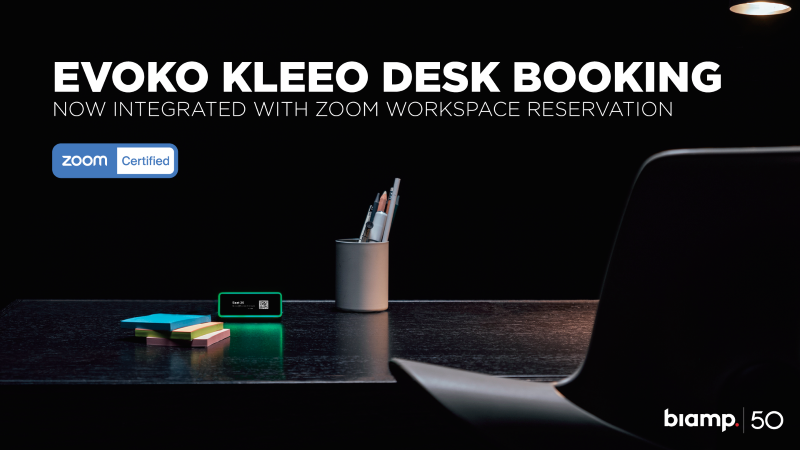
- Kleeo features an OLED touch screen, color-coded LED indicators, QR code access and Focus Mode.
- Green signals an available desk, yellow signals an upcoming booking and red signals an occupied desk.
- IT admins manage locations, desks and reservations in Zoom, while device provisioning happens in the Biamp Booking app.
- The device can sit on top of a desk or mount to the front edge.
What Did Biamp Announce?
Biamp announced that its Kleeo Desk Manager is now Zoom Certified for Workspace Reservation, a step that lets organizations bring desk booking directly into Zoom. The professional audiovisual provider says the certification is a way to give employees a unified, streamlined desk booking experience inside the collaboration tools they already use. For integrators serving hybrid workplaces, the news pairs a purpose-built scheduling device with a widely deployed platform.
“The certification of Kleeo Desk Manager for Zoom Workspace Reservation represents a major step forward in creating truly integrated workspace experiences for those organizations with flexible seating options,” says Joe Andrulis, executive vice president of corporate development at Biamp.
He continues, “Organizations have told us they want workers to have access to powerful workspace tools. With this integration, Kleeo brings Zoom Workspace Reservation to the physical desk experience. Employees can reserve and manage desks through Zoom Workspace Reservation, while Kleeo makes desk status immediately visible through its OLED display, color-coded LED indicators, clear on-device messages, QR code access, and Focus Mode. Whether walking up to an open desk or planning ahead, employees can quickly understand if a desk is available, reserved, occupied, or set to focus, and continue the booking flow through the Zoom experience they already use every day.”
How Does the Zoom Integration Work?
The Zoom integration lets employees reserve and manage desks through Zoom Workspace Reservation while Kleeo displays real-time status at the desk itself. Workers can walk up to an open desk or plan ahead, then complete the booking flow inside the Zoom experience they use daily. A QR code on the Kleeo display gives users a simple access point to book and manage their desk on Zoom Workspace Reservation. The approach ties the physical desk to the same platform where IT already manages Zoom licenses and devices.
What Features Does Kleeo Desk Manager Offer?
Kleeo Desk Manager offers an OLED touch screen, a bright color-coded LED indicator, QR code access and a Focus Mode built for flexible seating environments. The color-coded LED clearly signals desk availability: green for available, yellow for upcoming bookings and red for occupied. Focus Mode signals to colleagues when someone needs uninterrupted time, which helps productivity in open office layouts. The result is a desk status that employees can read at a glance without opening an app.
Who Manages the System, and How Is It Deployed?
IT admins manage the system in Zoom, while device provisioning happens through the Biamp Booking app. Zoom remains the main place to manage Workspace Reservation locations, desks and reservations, which keeps administration within a familiar environment. The Kleeo device can either sit on top of the desk or mount to the front edge, depending on organizational preference and desk design. That flexibility gives integrators room to fit the hardware to different workspace layouts.
What Does Zoom Say About the Certification?
Zoom says the certification is a value add for customers who want a simple, visible way to book desks. The company points to Kleeo’s design and its clear availability signaling as reasons customers will adopt it.
“Zoom is excited to add Kleeo as a Zoom Workspace Reservation certified device. Our customers are going to love the sleek design of the Kleeo and how easy it will be to view availability, busy or free, and quickly book a desk. We think this will bring tremendous value to our customers,” says Carleigh Noble, senior product manager at Zoom.
Why Does This Matter for AV, IT Teams?
This matters for AV, IT teams because it gives them a certified, interoperable desk booking solution to spec for clients refining hybrid work strategies. The pairing simplifies the desk booking process, reduces friction in daily workflows and reinforces that the tool lives inside the Zoom platform IT already manages.
As organizations work to optimize workspace utilization, the combination of Kleeo Desk Manager and Zoom Workspace Reservation offers integrators a clear story to bring to customers weighing flexible seating. It also lets them lead with employee experience rather than another standalone app.
Where Can You Learn More?
You can learn more by contacting Biamp about Kleeo Desk Manager and its Zoom Workspace Reservation certification. The company says the certification is part of a broader commitment to interoperable solutions that support workplace flexibility and employee satisfaction.
For teams already deploying Zoom, the integration offers a straightforward path to add desk booking at the hardware level.
If you enjoyed this article and want to receive more valuable industry content like this, click here to sign up for our digital newsletters!







Leave a Reply