• Skip to primary navigation
  • Skip to main content
  • Skip to primary sidebar
  • Skip to footer

My TechDecisions

  • Best of Tech Decisions
  • Topics
    • Video
    • Audio
    • Mobility
    • Unified Communications
    • IT Infrastructure
    • Network Security
    • Physical Security
    • Facility
    • Compliance
  • RFP Resources
  • Resources
  • Podcasts
  • Project of the Week
  • About Us
    SEARCH
Managed Service, News, Unified Communications

NoviSign Launches Studio AI, Turning Prompts Into Digital Signage Screens

NoviSign launches Studio AI in beta, using OpenAI's GPT models to build full digital signage screens from a typed or spoken prompt.

September 16, 2026 TD Staff Leave a Comment

NoviSign AI featured image_800px
Courtesy / NoviSign

Key Things to Know

  • NoviSign launched Studio AI, a tool that turns a spoken or typed prompt into a complete digital signage screen.
  • It’s built directly into NoviSign Studio and runs on OpenAI’s GPT models.
  • Users can update existing screens by describing the change instead of editing each element by hand.
  • The tool connects to a platform that manages more than 70,000 active screens worldwide.
  • Studio AI is available now in beta, with several complimentary prompts to start.

What Is NoviSign Studio AI?

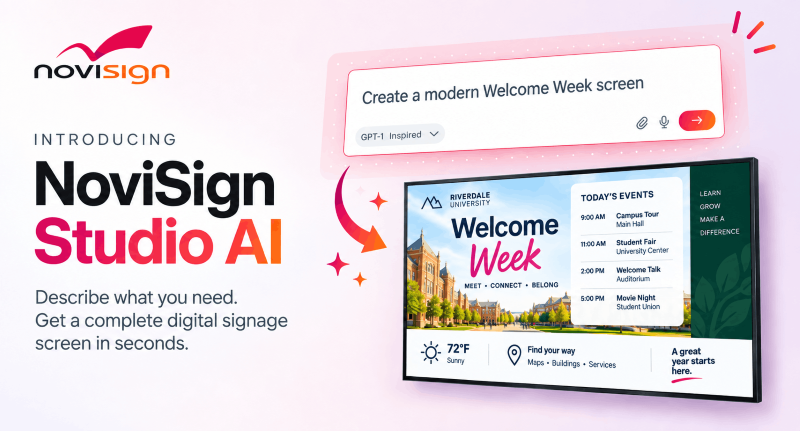
NoviSign Studio AI is a new AI-driven way to create, edit and manage digital signage content, the company announced this week. Built into the NoviSign platform, it replaces the traditional blank-canvas workflow with a conversation. Users describe the screen they need, and Studio AI generates the content, imagery, layout and visual hierarchy. That cuts the time and effort required to produce a finished creative.

How Does Studio AI Turn a Prompt Into a Screen?

Studio AI turns a prompt into a screen by interpreting a user’s request and building a complete creative around it. Users can type a request, speak through the microphone or attach their own assets, including logos and product images. Powered by OpenAI’s GPT models, the tool reads those instructions and produces a full digital signage creative. The result stays fully editable. Users can keep refining it through the AI conversation, switch to NoviSign’s drag-and-drop editor for manual control or move between the two at any point.

Can Users Update Existing Signage by Asking?

Yes, users can update existing NoviSign creatives and AI-generated screens simply by describing the change they want. When information shifts, they can explain the update rather than hunting down each affected element. For example, a café manager can ask Studio AI to create a promotion for a new iced coffee, then request a price change or add a product image. The tool applies the update while keeping the overall design consistent. Users can also ask it to simplify a crowded screen, emphasize key information, align a design with their brand or translate a full creative for different regions and audiences.

How Does Studio AI Fit Into Real-World Signage Workflows?

Studio AI fits into real-world workflows because it’s part of the cloud-based NoviSign platform, which currently manages more than 70,000 active screens worldwide. Unlike standalone generative tools, creatives move directly into the same workflow organizations already use to preview, save, schedule, publish and manage content across their networks. That connection links AI-assisted creation with content management and publishing, supporting the full path from an idea to every screen.

What Does NoviSign’s Leadership Say?

NoviSign says the tool is a way to move from concept to finished design faster. “NoviSign Studio AI brings new ideas to life in a fraction of the time,” says Gil Matzliah, CEO of NoviSign. “What once required design skills and considerable effort can now be done quickly, with beautiful results that match the user’s vision. Users can explore several alternatives, choose the best, and spend more time creating and less time on execution.”

When Can You Use It?

You can use Studio AI now, as it’s available in beta directly within NoviSign Studio. Users can test the experience with several complimentary prompts, and additional access options come through NoviSign subscriptions.

If you enjoyed this article and want to receive more valuable industry content like this, click here to sign up for our digital newsletters!


Tagged With: AI, content creation, Digital Signage, NoviSign, Studio AI

Related Content:

  • Nureva Console Room Assistant-pr-body-300dpi Nureva Launches Room Assistant, an AI Chat Tool…
  • BenQ Board CP05 left angle BenQ Board CP05: A Hands-On Review
  • Students attend hybrid classroom session. Students in person others join virtually on large screen. Blended learning environment clearly visible. Students listen attentively. Modern education Building Classroom AV Infrastructure That Adapts as Teaching…
  • yealink_in-article image-1 Yealink MeetingDisplay 55: A Smarter Display for Focus…

Free downloadable guide you may like:

  • Practical Design Guide for Office SpacesPractical Design Guide for Office Spaces

    Recent Gartner research shows that workers prefer to return to the office for in-person meetings for relevant milestones, as well as for face-to-face time with co-workers. When designing the office spaces — and meeting spaces in particular — enabling that connection between co-workers is crucial. But introducing the right collaboration technology in meeting spaces can […]

Reader Interactions

Leave a Reply Cancel reply

Your email address will not be published. Required fields are marked *

Latest Downloads

Practical Design Guide for Office Spaces

Recent Gartner research shows that workers prefer to return to the office for in-person meetings for relevant milestones, as well as for face-to-fa...

New Camera Can Transform Your Live Production Workflow
New Camera System Can Transform Your Live Production Workflow

Sony's HXC-FZ90 studio camera system combines flexibility and exceptional image quality with entry-level pricing.

Creating Great User Experience and Ultimate Flexibility with Clickshare

Working and collaborating in any office environment today should be meaningful, as workers today go to office for very specific reasons. When desig...

View All Downloads

Would you like your latest project featured on TechDecisions as Project of the Week?

Apply Today!

More from Our Sister Publications

Get the latest news about AV integrators and Security installers from our sister publications:

Commercial IntegratorSecurity Sales

AV-iQ

Footer

TechDecisions

  • Home
  • Welcome to TechDecisions
  • Contact Us
  • Comment Guidelines
  • RSS Feeds
  • Twitter
  • Facebook
  • Linkedin

Free Technology Guides

FREE Downloadable resources from TechDecisions provide timely insight into the issues that IT, A/V, and Security end-users, managers, and decision makers are facing in commercial, corporate, education, institutional, and other vertical markets

View all Guides
TD Project of the Week

Get your latest project featured on TechDecisions Project of the Week. Submit your work once and it will be eligible for all upcoming weeks.

Enter Today!
Emerald Logo
ABOUTCAREERSAUTHORIZED SERVICE PROVIDERSEVENT STANDARDS OF CONDUCTYour Privacy ChoicesTERMS OF USEPRIVACY POLICY

© 2026 Emerald X, LLC. All rights reserved.